


-
G1 17
-
G3 16
-
G5 10
-
PR1 6
-
Q3E 17
-
Q5 18
-
Q8 18
-
R1 15
-
Software Updates 0
-
Innioasis Y1 3
-
-
SR1 14
-
Y1 23
-
General Usage 2
-
-
Y2 20
Getting to know your player


Your Innioasis Y1 audio player features a simple button-driven interface designed to be simple to operate. To help you get started, please take your time to familiarise yourself with your player.
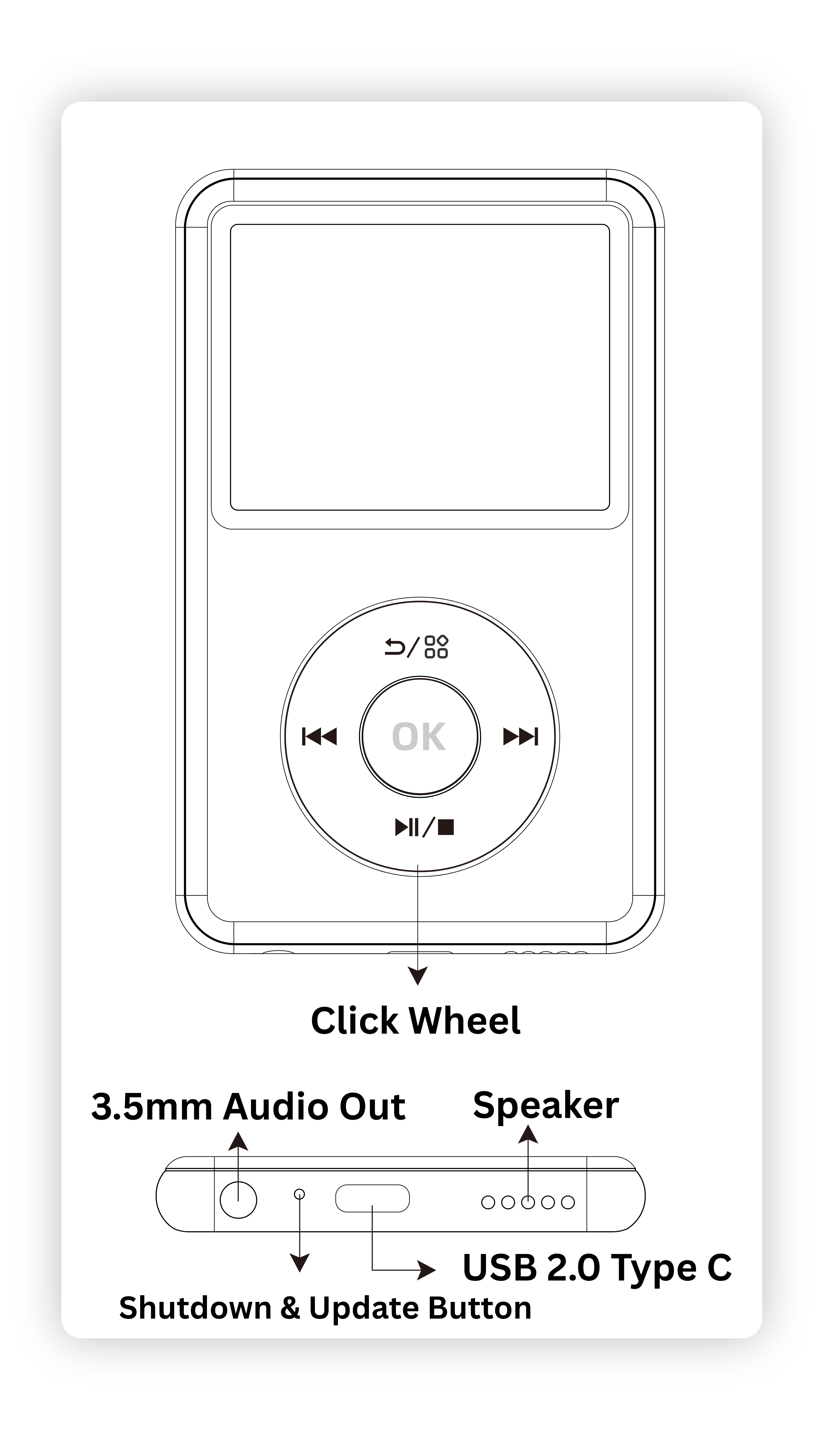
.png) Return / MFB(Multi-Function Buttons)
Return / MFB(Multi-Function Buttons)
Short press to go back to the previous
page, long press to activate certain specific
functions or shortcut menus, such as A-B
repeat, bookmarks, etc.
 Previous (Rewind)
Short press to skip to the previous track,
long press for fast rewind.
 Next (Forward)
Short press to skip to the next track, long
press for fast forward.
 Volume +(-) or switch options
Swipe clockwise to increase volume or
scroll down or right through options.
Swipe Anti-clockwise to lower volume or
Scroll up or left through options.
 OK / Power ON(OFF) / Screen OFF
Short press to confirm the current option.
Long press for 3 seconds to power on / off.
Long press for 5 seconds to screen off.
3.5mm audio output
Connect external headphones or speakers.
USB 2.0 Type C
Connect to a computer or adapter for
charging or files transfer.
Speaker
Built-in speaker for audio output.
Shutdown & Update Button
This hidden button turns power off to the device, this is useful if your device freezes. Powering off your device also puts it in Device Firmware Update (DFU) mode ready to update or restore your device in Innioasis Updater
Bluetooth
Key | Action | Result |
| | Short Press | Back to previous level |


